Who is this product best for?
- Point-to-point wireless links
- WISP customer connections
- Remote site connectivity
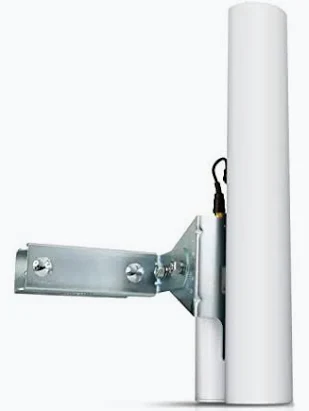
Works with compatible Ubiquiti UniFi, UISP or standard Ethernet networking equipment. Confirm controller, power and mounting requirements before purchase.
Check the product label or manufacturer datasheet for exact input voltage, PoE support and power adapter requirements.
The Ubiquiti airMAX Sector Antenna AM-5G19-120 is a passive 5GHz antenna for a deliberately designed outdoor wireless installation. Its sector pattern makes it relevant to a base station serving compatible fixed clients distributed across a planned area. Choose it as part of a complete system that includes a compatible radio, the correct RF connections, a suitable mount, power equipment for the radio, and an assessed wireless path. The antenna shapes radio energy; it does not independently establish a network service.
For buyers in Kenya, the most useful starting point is the intended deployment. Identify the locations, existing radio platform, traffic requirement, and mounting conditions before selecting an antenna by gain alone. A well-matched antenna can support an effective network connection, while an unsuitable pattern or unstable mounting position can undermine otherwise capable equipment. Confirm the exact model and the full accessory package when ordering so the installed assembly corresponds to the system that was planned.
Feature
Specification
Model
AM-5G19-120
Product type
Passive external RF antenna
Frequency class
5GHz
Gain
19dBi
Radiation arrangement
120° sector class
Polarization
Dual linear
Radio
Separate compatible radio required
Ethernet and PoE
Provided by the radio rather than the passive antenna
Application
Outdoor fixed wireless system
The AM-5G19-120 is a 19dBi sector antenna in the 120° product class. Its intended role is to form the antenna side of a base-station assembly, commonly with a suitably matched Rocket radio. The nominal sector description is not a promise that every customer inside a drawn angle receives an equal signal. Antenna patterns vary with frequency and polarization, and the complete installation includes height, tilt, client position, and intervening terrain.
Use the sector where the customer distribution justifies a broad directional service area. A group of receiving units spread across an estate, campus, or service-provider coverage zone may suit this approach when their paths and radio compatibility are appropriate. A sector does not provide 360° coverage, and the radio selected behind it still determines the supported wireless platform. A phone or laptop is not automatically the correct client for an airMAX base-station service.
The radio generates and receives the wireless signal, while the antenna directs that energy according to its pattern. The antenna has no normal Ethernet management address, wireless password, or operating-system configuration of its own. RF cables connect it to the radio, and Ethernet connects the radio to the network. This separation is useful when choosing the system, because changing an antenna affects the RF arrangement without automatically changing the radio's supported protocol or software features.
The radio also determines the power source and wired handoff. Do not apply PoE directly to an antenna connector or describe the passive antenna as drawing the same electrical supply as the radio. If an installation needs a new injector, select it around the exact radio input requirements. If a faster network connection is required, assess the radio and Ethernet path as well as the antenna. Antenna gain cannot create a Gigabit interface in equipment that lacks one.
Gain describes how the antenna concentrates energy compared with a reference; it is not an internet-speed rating. A higher gain figure does not independently establish a usable distance, customer count, or throughput guarantee. Both ends of the link, noise conditions, cable losses, permitted transmit settings, and path clearance affect the result. A useful buying decision therefore starts with a link assessment rather than treating the gain number as a stand-alone measure of service quality.
Antenna direction is equally important. A sector must place the intended client group within its useful horizontal and vertical pattern. Customers near its edge can have different conditions from clients directly ahead, so representative coverage testing matters. Use the final radio measurements and traffic results to assess the assembly instead of approving it solely because the antennas appear to face each other.
Confirm frequency coverage, connector type, polarization arrangement, mounting compatibility, and supported radio use before buying. A shared 5GHz description is only the first check. The radio must also communicate with the remote platform, and the antenna assembly must suit the intended operating band and installation. If a network currently uses a specific radio generation, replacing only its antenna does not upgrade the wireless protocol. Record the current equipment at both ends before choosing replacement parts.
Connect both intended RF chains correctly and protect the jumpers from strain. An incorrectly seated connector, damaged cable, or poorly matched adapter can create imbalance between the radio chains and reduce performance. Avoid unnecessary chains of adapters merely to make unlike fittings join together. Keep the RF leads arranged according to the antenna and radio instructions, and do not use the cable as a handle for lifting or positioning either component during installation.
Survey terrain, trees, roofs, metal structures, and likely future obstructions between the intended endpoints. A visible gap is not the entire clearance requirement for a fixed wireless path. Seasonal foliage and new construction can change a connection that appeared acceptable during a quick inspection. Where clearance is inadequate, reconsider the mounting positions or network route. Extra transmit power or a larger antenna is not a dependable way to bypass a physically unsuitable path.
For a business link, record what must remain available at the remote site. An office connection, camera backhaul, and subscriber distribution system may have different traffic and reliability requirements. Identify the busiest expected operating period and the minimum acceptable service. That information allows the installer to evaluate the antenna and radio combination against a useful target rather than a single favorable test. Allow for backup power and maintenance access at both ends of the connection.
Use a support suitable for the complete antenna assembly, exposure, and site conditions. Consider the antenna, radio, brackets, cables, and any approved protective accessories together. A pole that appears adequate for a small CPE may be unsuitable for a larger antenna or for several co-located units. Have the support and installation method assessed by a competent installer. The hardware's published environmental characteristics do not certify every roof, wall, or mast to which it might be attached.
Keep fasteners accessible for alignment and later inspection, while preventing cable movement from pulling on the antenna. Do not rely on a plastic cable tie as the sole structural support for an assembly that requires a mechanical bracket. Protect connectors and follow the specified grounding and weather-sealing arrangement. Plan safe access before commissioning: an antenna that can only be adjusted by leaning across an unsafe roof edge is a maintenance problem even if its initial signal is strong.
An antenna pattern can influence the interference received from different directions, but it does not remove all unwanted transmissions. Survey conditions at the actual installation height and check the remote site as well. Nearby transmitters, channel overlap, and changes in local activity can affect the radio service. Select the operating channel and width through the radio according to the site assessment and permitted settings. The widest available channel is not automatically the best choice for a congested location.
Where several radios share a site, plan their positions and operating settings together. Consider the direction each antenna faces and the relationship between the intended links. Timing coordination, where supported by the radios, requires a deliberate system configuration rather than an antenna change. Keep records of channel assignments and sector directions so a later addition does not unintentionally disrupt a working link. Interference testing is particularly valuable before committing a new subscriber group or business application to the system.
1. Define the service. List the endpoint locations or intended client group, required traffic, existing radio models, and installation constraints. Decide whether the project is a point-to-point transport link or a planned base station. Select the antenna pattern around that requirement before ordering mounting hardware.
2. Verify the complete hardware combination. Match the antenna model, radio, RF jumpers, feed arrangement, and any required conversion hardware. Confirm what the supplied package includes and what must be purchased separately. For replacement work, compare the installed labels and photographs rather than assuming all similarly named antennas share the same parts.
3. Inspect the delivered antenna and mounting kit. Check for transport damage, bent components, missing fasteners, and damaged connectors. Keep protective parts associated with the correct assembly. Resolve an incomplete package before traveling to a difficult installation site, especially where access requires a separate appointment or lifting equipment.
4. Prepare and test the radio at ground level. Use its approved supply, assign a unique management address, and secure administrator access. Confirm the supported counterpart and intended operating mode. The passive antenna itself does not need an IP address; all network configuration is performed on the connected radio and wider network.
5. Assemble the antenna according to its own instructions. Fit the feed and mounting components in their intended orientation. Avoid bending the reflector or putting stress on the sector enclosure. Do not substitute fasteners or accessories that interfere with the specified attachment, alignment, or weather protection.
6. Attach the radio and RF jumpers while power is disconnected. Connect the intended chains to their correct ports and keep the leads within suitable bend limits. Use the approved weather-protection arrangement. Complete the RF assembly before enabling transmission, and verify any required polarization or conversion-kit orientation.
7. Secure the complete assembly to the assessed support. Leave only the intended adjustment points free for aiming. Route cables with strain relief and suitable service allowance. Complete the grounding, building-entry protection, and power arrangements before treating the installation as ready for service.
8. Aim the sector around the actual client group. Set its azimuth and elevation using the planned coverage, then connect representative clients near the center and boundaries. Record each client's path and signal conditions. A close client directly in front does not establish adequate coverage for the whole service area.
9. Apply the final radio settings. Enter the installed antenna information where the radio requires it, select permitted operating parameters, and configure the planned wireless security. Check the remote equipment at the same time. An antenna installation is not complete if the radios have mismatched channel, role, or security settings.
10. Test the network service. Confirm management access, expected addressing, and the intended traffic path. Test both directions and use representative loads. Separate local transport testing from an internet speed test so a restricted upstream service does not conceal the link's condition or create a misleading acceptance result.
11. Record commissioning results and hand over the installation. Keep antenna direction, radio configuration, signal readings, test conditions, photographs, and maintenance access details together. Label the radio, injector, and cable destination. Preserve a rollback plan when the work replaces an existing operational connection.
If the radio is unreachable, begin with its power and Ethernet connection rather than immediately adjusting the antenna. If the radio is reachable but no wireless association appears, check the counterpart, frequency, role, and security. If the signal is weak or the chains differ unexpectedly, inspect alignment, RF connectors, jumpers, and polarization arrangement. Change 1 variable at a time and retain the original measurements so the effect of each correction can be assessed.
If performance changes during wind, inspect the support and bracket stability. If it changes after rain, investigate sealing, cable entry, and water damage using safe access procedures. If signal remains steady while traffic slows, assess interference, radio settings, Ethernet negotiation, and the upstream network. The antenna is only 1 element of the service path. Replacing it without isolating the fault can leave the underlying power, cable, or configuration problem unresolved.
A separate antenna lets a network designer choose a radiation pattern around the installation rather than accepting the pattern of an integrated CPE. It also allows the antenna and compatible radio to be assessed as distinct service components. The sector arrangement is useful when a planned group of fixed clients needs service from the same base-station direction. Correct mounting, matching RF connections, and commissioning records make the resulting system easier to maintain.
This passive antenna requires a separate compatible radio and supporting hardware. It does not provide standalone Wi-Fi, internet, Ethernet switching, or device management. Mounting and alignment demand more planning than simply placing a room router on a desk. Shared spectrum and path obstructions still affect the connection, and antenna gain alone cannot guarantee availability. Budget for the complete assembly, installation, protection, testing, and future maintenance when comparing it with an integrated outdoor radio alternative.
No. The radio supplies the active wireless functions and the connection to the Ethernet network. This antenna directs the RF signal. Order a compatible radio and power arrangement alongside it unless the installation already has suitable equipment that has been checked for reuse.
No. Distance is a system result involving the antenna and radio at both ends, path clearance, interference, channel settings, and required service margin. A professional path assessment and on-site testing are more useful than an isolated distance claim that omits those conditions.
No. The subscription remains an upstream service. A better-matched RF arrangement may address a transport limitation in a suitable design, but it does not increase the purchased broadband allocation. Test the local wireless connection and the internet service separately when assessing performance.
The passive antenna has no controller adoption process. Configuration belongs to the connected radio and its supported management system. Ubiquiti product branding alone does not mean that an airMAX or airFiber radio is managed in the same way as a UniFi indoor access point.
Provide the current radio model, intended counterpart, endpoint locations or client map, installation photographs, and required traffic. For a replacement, add the original antenna label and mounting details. This makes it easier to check the complete combination and avoid purchasing a physically similar but unsuitable part.
Compare quotations using the same scope. The antenna may be only 1 line in a working link that also requires a compatible radio, feed components, RF jumpers, mounting support, power equipment, Ethernet cabling, protection accessories, configuration, and commissioning. A lower antenna-only quotation can therefore be incomplete for the intended service. Ask which parts are included and which existing components have been assessed for reuse. For a paired connection, confirm the requirements at both locations rather than costing only the more accessible site.
Consider maintenance access as part of that comparison. An installation that needs special access every time a connector is inspected may have a different operating cost from an equally suitable accessible position. Keep the final assembly documented so replacement jumpers, brackets, and radios can be selected accurately. If the site is shared with other tenants or operators, agree on cable routes and equipment positions before work begins. A clear physical plan helps avoid later moves that change alignment or introduce new interference.
A useful handover includes more than a favorable signal reading. Test the required traffic while observing latency, packet loss, radio-chain status, and wired interface behavior. Run tests long enough to expose instability and compare both directions where the application needs them. Record the channel, width, endpoint models, and environmental conditions alongside the result. A later technician can then distinguish an original design limitation from a changed path, a new transmitter, or physical movement after installation.
For a connection carrying cameras, account for simultaneous stream traffic and the viewing or recording design. For an office service, include the effect of uploads, backups, and real-time calls. For subscriber distribution, assess the client mix and busy-period load. These applications place different demands on the radio system even when the antenna is unchanged. Select the antenna and radio around the expected service, then verify that service at handover rather than assuming the gain figure proves sufficient capacity.
Keep the antenna model, radio serial number, RF lead arrangement, mounting photographs, and approved accessories together in the service record. Inspect accessible fasteners and cable protection at suitable intervals and after severe weather where safe access is available. If the assembly is moved, repeat alignment and traffic checks. Do not treat the previous commissioning result as valid after a material change in mounting direction, antenna feed, radio platform, or nearby construction.
Choose the Ubiquiti airMAX Sector Antenna AM-5G19-120 from Ubiquity UniFi Kenya as part of a complete planned wireless system. Confirm the exact antenna version, compatible radio, RF jumpers, required accessories, and mounting arrangement before ordering. Ask for warranty and delivery details and specify whether the purchase is a replacement or a new deployment. For a new site, include the path or client information so product selection reflects the service you need to deliver.
Compare the exact model first, then assess the complete alternative system. A shared brand, frequency, or connector does not establish compatibility. Different radio platforms, antenna arrangements, and power accessories must be checked separately before substituting equipment.
LiteAP 120 integrated sector alternative; PowerBeam AC Gen2 integrated radio alternative; NanoStation Loco M5
NanoStation 5AC Loco; PowerBeam M5 400; LiteAP GPS sector option
LiteAP 120 sector option; Ubiquiti wireless model comparison; DISC Lite5 ac alternative platform
LHG 5 ac alternative platform; LHG XL 5 ac alternative platform; Outdoor wireless equipment at Reisen
Point-to-point radio alternatives at Orbitlink
Ubiquiti airFiber 5XHD AF-5XHD; Ubiquiti RocketDish 5G30 RD-5G30; Ubiquiti airMAX Rocket Prism 5AC Gen2 RP-5AC-Gen2
Reviews are not available yet for this product.
Ubiquiti airMAX Sector Antenna AM-5G19-120 Price in Kenya is currently listed as available. Stock can change, so confirm availability before placing a large order.
The current listed price is KSh 25,000.00. Prices are generated from the product catalogue and may change when inventory is updated.
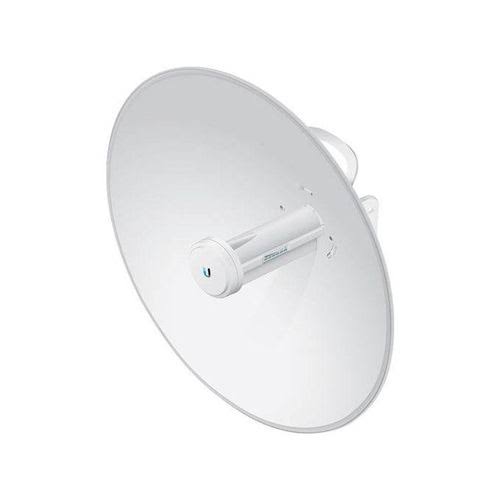
Buy Ubiquiti RocketDish RD-5G30 in Kenya. Get a 30dBi dual-polarized directional antenna for a compatible radio and point-to-point l