Who is this product best for?
- Home network upgrades
- Business network deployments
- ISP and installer projects
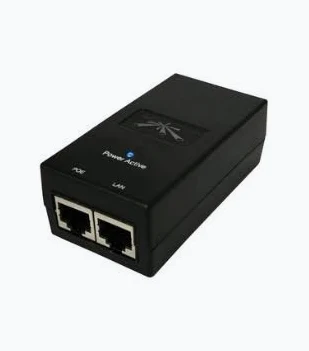
Works with compatible Ubiquiti UniFi, UISP or standard Ethernet networking equipment. Confirm controller, power and mounting requirements before purchase.
Check the product label or manufacturer datasheet for exact input voltage, PoE support and power adapter requirements.
The Ubiquiti PoE Adapter 48V 0.5A supplies power and Ethernet data to compatible networking equipment through a single cable. It is a practical choice when replacing a matching injector or powering a supported device from a router or switch that does not provide the required PoE output.
Its nominal output is 24W, calculated from 48V × 0.5A. For installations requiring Gigabit connectivity, specify the POE-48-24W-G. Ubiquiti also documents a POE-48-24W version without a Gigabit LAN port, so the full model number matters when ordering.
Buying a replacement? Share the powered device’s model and a photograph of the original adapter label before ordering. Matching the voltage alone is insufficient; the powering method, polarity, available power, and Ethernet speed must also fit.
The following specifications apply to the POE-48-24W-G Gigabit model.
Feature
Specification
Manufacturer model
POE-48-24W-G
Output voltage
48V DC
Rated output current
0.5A
Nominal output capacity
24W
Ethernet capability
Gigabit LAN
Connections
Data input and powered Ethernet output
Powering arrangement
2-pair: pins 4 and 5 positive; pins 7 and 8 negative
AC input
100–240V AC, 50/60Hz
AC connector
IEC-320 C6
Dimensions
92 × 60 × 33mm
Weight
159g
Operating temperature
0–40°C
Protection
Surge and clamping protection
Remote reset
Not supported
Configuration
No software configuration required
This adapter suits customers who need:
· A replacement for an existing, correctly matched 48V 0.5A injector.
· Individual power for a compatible radio or other supported network device.
· A Gigabit data path without replacing an otherwise suitable non-PoE switch.
· A matching spare for maintaining an established installation.
It is particularly useful for a small installation with 1 compatible powered endpoint. Where several devices need centralized power, compare the complete installation with an appropriately specified PoE switch.
The injector receives an Ethernet connection from your router or switch through its LAN/Data input. Its separate powered output sends the network connection and the specified DC supply toward the compatible endpoint.
The adapter also connects to an AC power outlet. This allows the remote equipment to receive power through its Ethernet cable without requiring an electrical socket beside it.
Connection
Connect to
Purpose
AC input
Correct grounded mains lead and electrical supply
Powers the injector
LAN/Data input
Router or switch LAN port
Receives network data
PoE output
Verified compatible powered device
Carries data and DC power
Connect the upstream router or switch to the LAN input—not to the powered output.
The POE-48-24W-G supports Gigabit Ethernet, helping preserve a suitable Gigabit wired connection between the upstream network and the endpoint.
However, it does not increase an internet subscription’s speed or upgrade a 100Mbps device. The endpoint, switch, cables, and terminations must all support the intended connection rate.
Model
Output
Gigabit LAN
Selection consideration
POE-48-24W-G
48V, 0.5A
Yes
Choose when the endpoint supports this power arrangement and Gigabit connectivity is required
POE-48-24W
48V, 0.5A
No
Check carefully before replacing a Gigabit injector
For a like-for-like external comparison, see the Ubiquiti 48V 0.5A PoE adapter at Orbitlink Solutions. Compare the complete SKU and package contents rather than the voltage description alone.
For another product in the same general category, compare the 48V Gigabit passive PoE injector at Tawa. Confirm its complete manufacturer model, electrical arrangement, and supplied power equipment before treating it as a replacement.
This is not a universal injector for every Ubiquiti product. A device consuming less than 24W is not automatically compatible.
Equipment or requirement
Compatibility guidance
Endpoint explicitly supporting this 48V passive powering arrangement
Potentially suitable after confirming power demand, polarity, and model requirements
Device supporting only 24V passive PoE
Unsuitable; use its specified power source
Equipment requiring IEEE 802.3af/at/bt power
Do not assume compatibility; confirm the manufacturer-approved supply
Equipment requiring more than the available power
Select an appropriately rated source
Non-PoE router or switch
Can provide data through the injector’s LAN input
Endpoint requiring 2.5GbE or faster backhaul
The Gigabit model does not preserve a multi-gigabit connection
Starlink dish or proprietary dish connection
Not a replacement power supply
For equipment requiring a different voltage, explore the Ubiquiti 24V 0.5A PoE adapter. The 24V and 48V versions are separate electrical choices, not interchangeable accessories.
Brand or solution
When to consider it
What to verify
Ubiquiti
Replacing an injector specified for a particular Ubiquiti endpoint
Complete injector SKU, voltage, powering arrangement, and Ethernet rate
MikroTik
Powering equipment with documented MikroTik-compatible input requirements
Supported voltage range, polarity, power demand, and injector arrangement
TP-Link
A deployment specifying a particular standards-based PoE injector
Exact IEEE standard, available output, and supported data rate
PoE switch
Several endpoints need centralized power
Per-port standard, shared budget, port speeds, and endpoint compatibility
Choose around the receiving device’s requirements rather than brand preference alone. The TP-Link TL-POE150S at Tawa is an alternative to assess when the receiving device calls for its documented PoE arrangement. For a MikroTik installation, compare the MikroTik RBGPOE at MikroTik Kenya, including its separately required DC supply. Neither is an automatic substitute for this Ubiquiti adapter.
Yes—as part of a Starlink-connected Ethernet network, when it powers a compatible downstream device. It does not power the Starlink dish or replace Starlink’s supplied power equipment.
A suitable installation uses the Starlink system’s Ethernet LAN connection as the data source. That connection feeds the injector’s LAN input, while the powered output connects to the verified compatible endpoint.
The Ethernet connection method depends on the Starlink hardware. Router 3 includes LAN Ethernet ports; other configurations may require the appropriate accessory. Where applicable, the Starlink Ethernet Adapter from Starlink Kenya Installers provides an accessory option to investigate for the matching Starlink system.
If the endpoint requires a different voltage or PoE standard, select another power source even though the upstream internet connection is Starlink.
If the endpoint requires a different PoE class, compare a suitable injector such as the TP-Link TL-POE160S at Reisen SEO. Match the manufacturer's requirements rather than assuming that a higher-wattage product is automatically compatible.
Where a design requires voltage conversion rather than simple injection, investigate a purpose-built option such as the MikroTik RBGPOE-CON-HP. Verify the complete source-to-converter-to-endpoint arrangement before ordering. A converter performs a different job from this standalone injector.
For multiple endpoints, compare the UniFi Switch Lite 8 PoE at Network Switch Kenya or the larger UniFi Standard 24 PoE at Reisen SEO. Assess powered-port count, individual power classes, shared budget, and management needs. A PoE switch should replace separate injectors only where its outputs support the actual endpoints.
For a broader selection of power accessories, browse Ubiquiti PoE adapters at Orbitlink Solutions, starting with the exact model and then checking suitable alternatives.
Ubiquiti lists a power cable with the POE-48-24W-G manufacturer package. Confirm the supplied regional plug and contents when ordering a replacement or individually supplied unit.
A complete installation also needs:
· A verified compatible powered device.
· A working Ethernet connection from a router or switch.
· Suitable Ethernet cables.
· A correctly grounded electrical supply.
· Appropriate cable protection and weatherproofing where the endpoint is outdoors.
Browse our Ubiquiti network accessories when planning supporting equipment.
1. Identify the endpoint. Check its complete model number and documented power requirements. Compare the original injector label where available.
2. Confirm the replacement variant. Specify POE-48-24W-G if Gigabit Ethernet is required. Check voltage, polarity, powering method, and sufficient power capacity.
3. Choose a protected location. Keep the injector indoors, dry, ventilated, and within its operating temperature range. An outdoor radio does not make its indoor injector weatherproof.
4. Connect the data input. With power disconnected, connect a router or switch LAN port to the injector’s LAN/Data input.
5. Connect the endpoint. Run the second Ethernet cable from the injector’s PoE output to the endpoint’s designated compatible power input.
6. Connect AC power. Use the correct mains cable and a properly grounded supply. Allow the endpoint to start.
7. Test the installation. Confirm endpoint operation, network access, and the negotiated Ethernet speed. Investigate an unexpected 100Mbps connection through cable, termination, and port checks.
8. Label both cables. Identify the data input and powered output to reduce mistakes during later maintenance.
The injector itself does not require UniFi adoption, an IP address, or a software license. Configure the connected endpoint separately.
The adapter includes surge and clamping protection. Effective grounding and a correctly designed cable installation remain important, especially when the connected equipment is outdoors.
These protection features should not be treated as a guarantee against direct lightning damage. Follow the endpoint’s installation instructions for grounding, shielded cabling, surge protection, and building-entry arrangements.
Advantages
Limitations
Supplies power and data through the endpoint’s Ethernet cable
Requires exact electrical compatibility
Gigabit connectivity on the G variant
Gigabit is the data-rate ceiling for that variant
Useful with a suitable non-PoE switch
Powers 1 endpoint rather than a group of devices
No injector software setup required
No remote-reset capability
Integrated protection features
Requires a protected installation location and proper grounding
Problem
First checks
Endpoint does not start
Power source, correct output socket, cable continuity, and endpoint compatibility
Endpoint repeatedly restarts
Power demand, cable condition, voltage loss, and adapter condition
Device has power but no network
LAN input connection, upstream port, endpoint configuration, and Ethernet cable
Gigabit endpoint connects at 100Mbps
Injector suffix, cable pairs, terminations, and both Ethernet ports
Disconnect the adapter before investigating damaged cables or connectors. Replace visibly damaged power equipment rather than continuing to use it.
A correctly matched adapter helps you avoid an unnecessary return visit, an incomplete installation, or ordering the wrong power accessory.
When requesting a quotation, provide your endpoint model, original adapter details, and required Ethernet speed. You can also discuss supporting accessories and confirm the offered package, warranty terms, stock availability, and collection or delivery arrangements before payment.
Use our contact page to request the correct adapter for your installation.
Can it replace a 24V 0.5A adapter?
Not for equipment that supports only 24V. Equal current ratings do not make different voltages interchangeable.
Will it power every UniFi access point?
No. Check the exact AP’s required power method and manufacturer-approved supply. Some models require different PoE standards or higher power.
Will it improve Wi-Fi coverage?
It supplies power and carries Ethernet data. Coverage comes from the connected access point or radio and its installation.
Does it need a subscription?
The injector itself does not require a subscription. The connected equipment or internet service may have separate requirements.
Request the Ubiquiti PoE Adapter 48V 0.5A with your endpoint model and required Ethernet speed. Confirm the complete SKU, current selling price, VAT treatment, package contents, warranty, and delivery arrangements before ordering.
For a Gigabit installation, specify POE-48-24W-G and verify that its power arrangement matches your equipment.
Reviews are not available yet for this product.
Ubiquiti PoE Adapter 48V 0.5A Price in Kenya is currently listed as available. Stock can change, so confirm availability before placing a large order.
The current listed price is KSh 2,500.00. Prices are generated from the product catalogue and may change when inventory is updated.
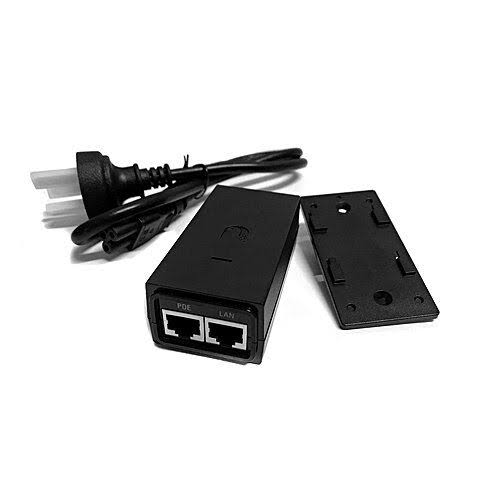
Buy Ubiquiti 24V 0.5A PoE Adapter in Kenya. Power compatible passive-PoE devices and choose the correct Fast Ethernet or Gigabit ver